
All the latest ContractZen feature updates are listed here.
February 11, 2026
One-Click AI Access in List View & Advanced Search
This week, we're introducing instant AI access directly from list views, additional search operators, and markdown features in the AI chat.
Instant AI Access to Attachments in List View
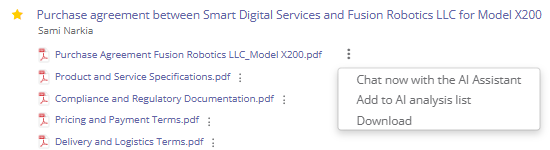
Attachments in list views now support instant AI-powered actions, so you can work with files without opening them.
From the list view, you can now:
- Chat with the AI Assistant about a specific attachment.
- Add or remove the attachment from the AI analysis list.
- Download the file instantly.
These improvements reduce unnecessary clicks and context switching, making it easier to analyze documents, manage files, and stay focused on what matters.
Advanced Search: NOT Operator Added
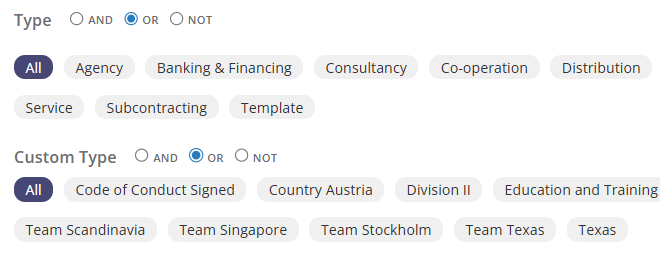
Advanced search filters now support the NOT operator in multiselect fields for contracts, entities, and meetings.
This enhancement allows users to:
- Exclude specific values from search results.
- Find items that do not contain certain types, tags, or classifications.
- Refine searches more precisely with fewer filters.
With the NOT operator, advanced search becomes more flexible and helps you find exactly what you’re looking for faster and with less manual effort.
Discover Our Powerful Markdown Features
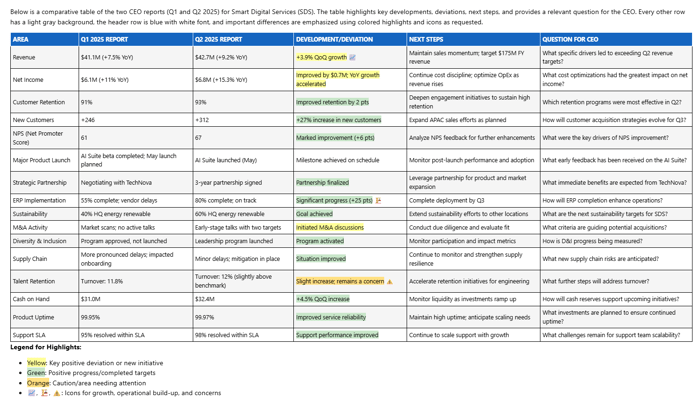
Did you know you can create stunning, easy-to-read tables and documents in our AI Assistant using enhanced Markdown?
With features like icons, color highlights, bold text, and even modern comparison tables (like the one above), presenting complex information has never been easier—or more attractive!
Whether you need to compare agreements, summarize contracts, extract key compliance terms, organize board meeting notes, or visualize obligations, ContractZen AI assistant and our Markdown tools help you communicate clearly and professionally.
January 20, 2026
MS Teams Integration in Board Portal & List View Enhancements
We have introduced two practical updates to make meeting preparation and daily governance work faster and more seamless. The new Microsoft Teams integration reduces tool switching during meeting setup, while improved list views give you instant visibility into related files across the platform. Together, these updates help teams stay organized, save time, and work with greater clarity.
Microsoft Teams Integration
When creating a meeting in ContractZen, it is now possible to set up a Microsoft Teams meeting directly within the platform.
This integration allows users to:
- Create a Teams meeting without switching tools
- Keep meeting details, links, and materials in one place
- Simplify meeting preparation for boards and management teams
Everything needed for the meeting is handled within ContractZen, reducing manual steps and context switching.
Improved List Views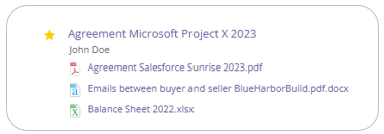
You can now instantly see all attachments related to any item directly in the main list view across all modules, including:
- Document management
- Board portal
- Legal entity management
No more opening multiple views to check which files are attached. Everything is visible directly in the list.
November 26, 2025
Introducing AI Document Comparison in ContractZen
As governance work grows more data-heavy, many of you have asked for a faster way to compare documents and ensure consistency and accuracy—without ever compromising security.
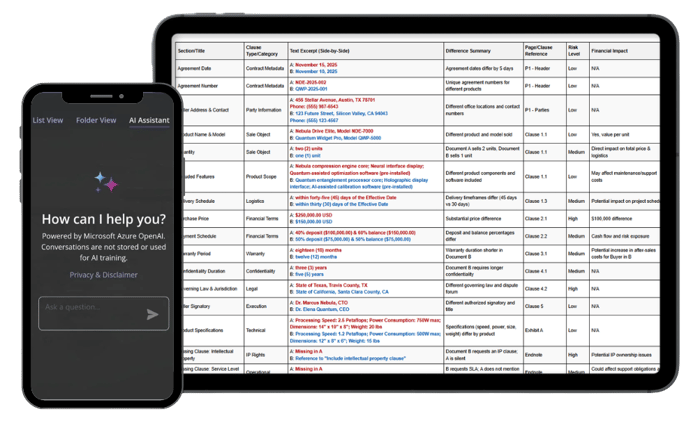 Try the AI-comparison Magic
Our latest innovation makes it effortless to spot every difference between two documents and lets you chat about those differences. This powerful tool supports your daily work across contracts, board materials, compliance documents, and financial records.
Key Benefits:
- AI-Enhanced Analysis: Compare any two documents—contracts, meeting minutes, reports, or even images. Select files from your ContractZen account or upload them directly from your computer.
- Versatile Use Cases: Ensure contract consistency and track strategic goals by comparing quarterly reports against previous plans.
- Complete Data Security: Everything happens securely within the ContractZen environment. No external data storage, no model training—your privacy is guaranteed.
- Easy-to-Use Prompts: Get started with ready-made examples or create your own questions to fit your needs.
The new AI comparison feature is available in all modules of ContractZen, including the board portal, contract management, and legal entity management.
September 03, 2025
A Fresh Look, Smarter Experience
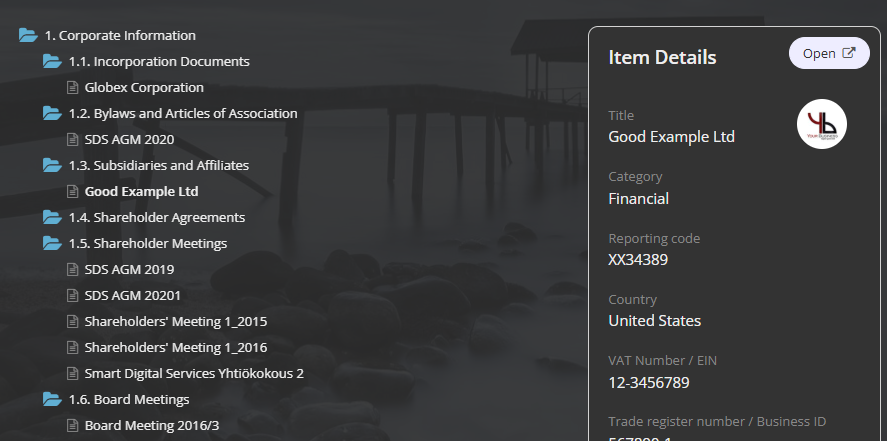
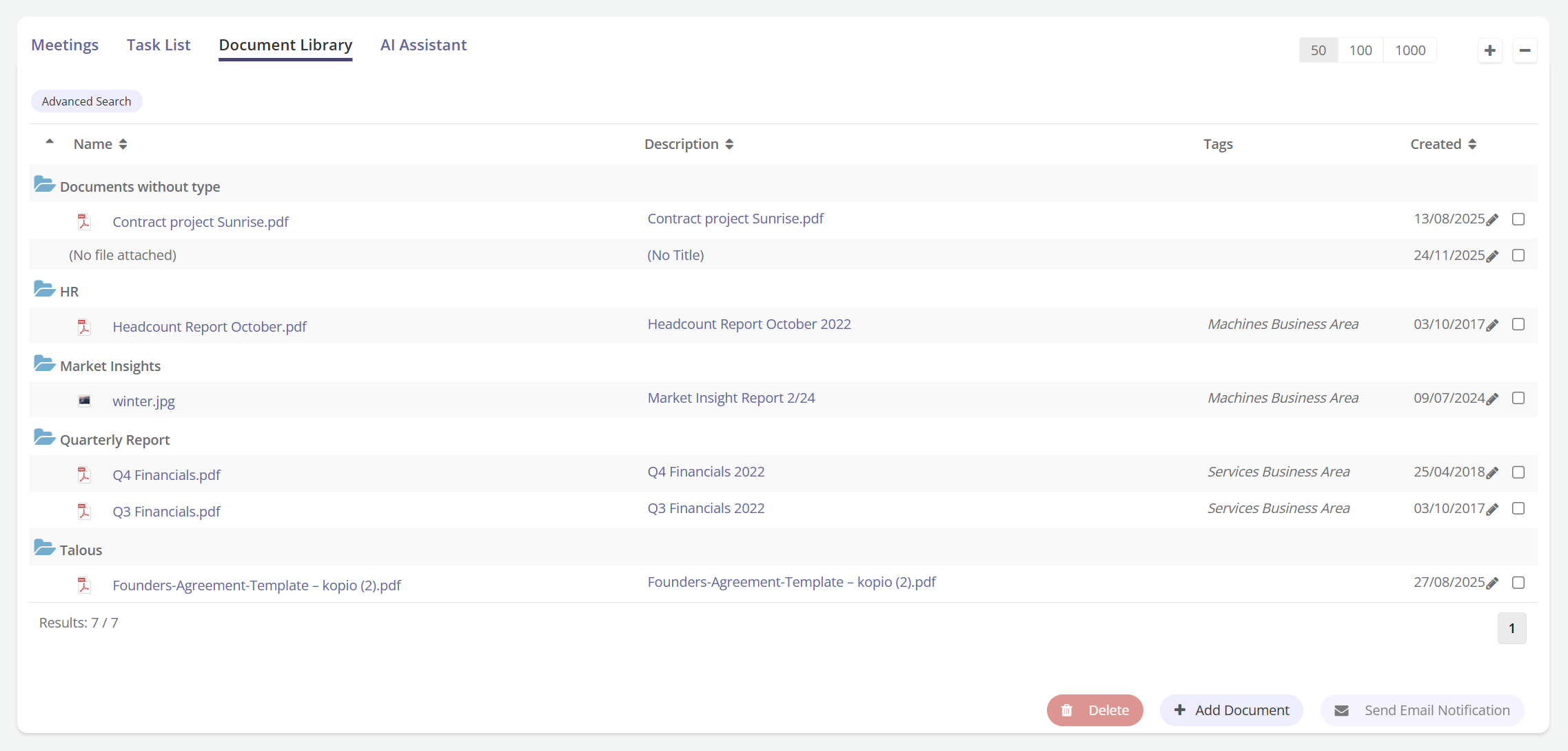
We’ve made ContractZen smarter and visually more modern. The refreshed UI offers a cleaner look and smoother navigation across contracts, board portal, SmartIndex, and entity management.
|
Files by Tags |
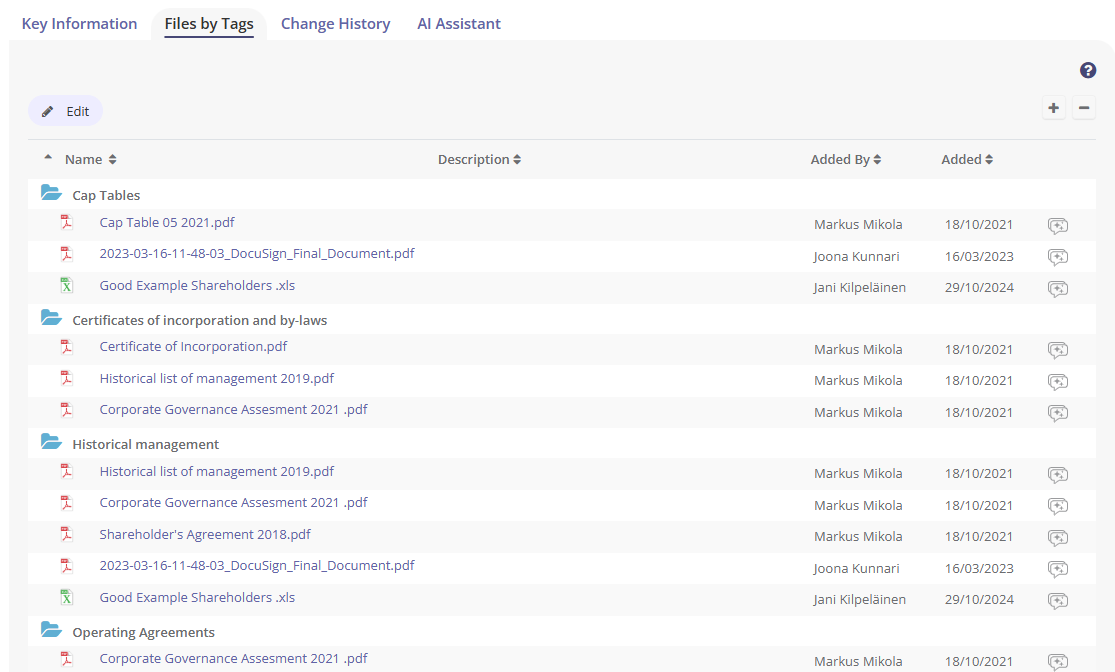
|
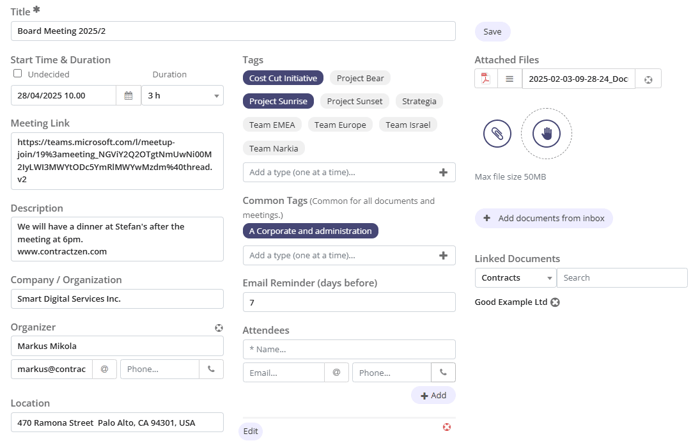
|
Lighter Edit Mode |
|
Folder View |
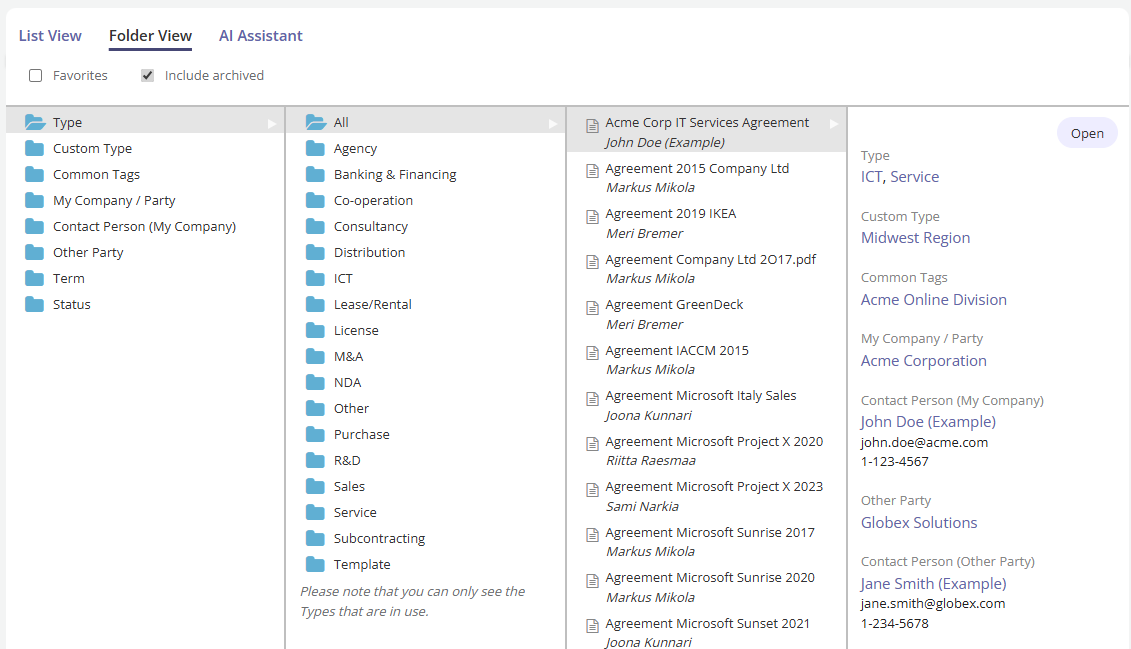
|
|
SmartIndex UI |
|
Board Portal Library |
|
July 01, 2025
Introducing Document Insights in Board Portal
Take your meeting productivity to the next level with AI-powered Document Insights.
Also in this newsletter: Save filters in Entity Management, assign and view SmartIndex folders, export reminders to Excel, and use new searchable fields in Other Documents.
AI Document Insights now available in Meetings
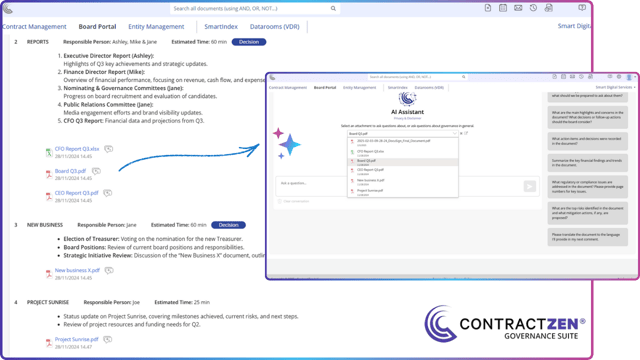
You can now chat with the AI about your meeting documents—right inside the Board Portal.
The AI Assistant helps you interact with files located on the Meeting Overview page and attachments in the Agenda. Just click the sparkly chat bubble next to a document to ask questions on any language, summarize content, or clarify details. It’s like having an AI co-pilot for every meeting—saving you time and helping you focus on what matters.
While you can ask anything you'd like about the documents, here are some example questions we've picked to help you get up to speed:
- Provide a bullet-point summary of the document.
- What are the key points in the document, and what should we be prepared to ask about them?
- What are the main highlights and concerns in the document? What decisions or follow-up actions should the board consider?
- What action items and decisions were recorded in the document?
- Summarize the key financial findings and trends in the document.
- What are the top risks identified in the document and what mitigation actions, if any, are proposed?
- Please translate the document to (the language of your choice)
Note: You can only chat about agenda attachments after the agenda has been published. Also, if the AI Assistant isn’t available to you, please contact your account administrator to enable access and/or purchase additional AI Quota.
Other Updates
Saved Searches in Entity Management
You can now save your favorite search filters in the Entity Management section. Easily access them from a dropdown and jump straight to the data you need—without rebuilding your search every time. These saved searches are personal, just like in Contract Management.
SmartIndex Updates
Assign documents to SmartIndex folders during Mass Import for faster setup.
When an item is added to a SmartIndex folder, the folder name is now visible on the list view and key info pages—so you can quickly see where each document is stored.
Excel Export Improvements
Reminder details from Contracts and Entities are now included in Excel exports. Just click Export to Excel at the bottom of the list view in any Contract or Entity Management section to download your customized data set.
New Key Information Fields in Other Documents
We’ve added new searchable metadata fields to the Other Documents category:
- My Company / Party
- Contact Person (My Company)
- Other Party
- Contact Person (Other Party)
Admins can also hide any of these fields via the Metadata Field Settings page to keep your view clean and relevant.
April 29, 2025
Meet Our Newest AI Feature!
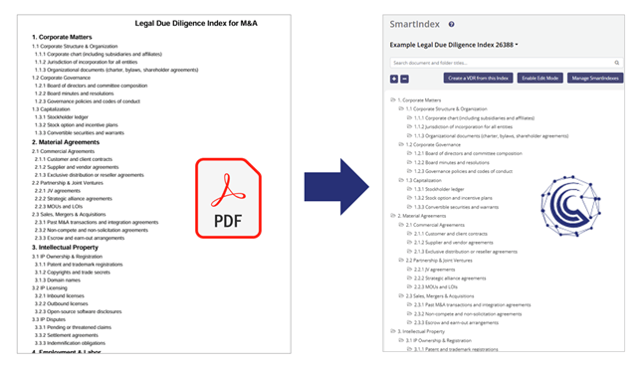
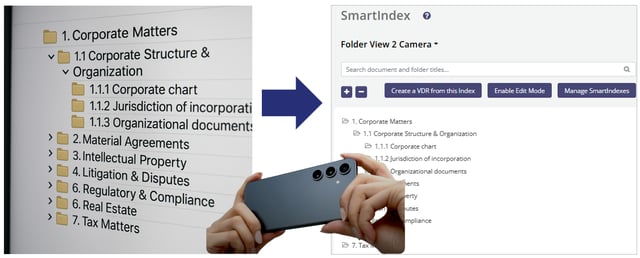
Organizing complex folder structures just got a whole lot easier. With our new Index from File (AI) feature, you can now generate complete SmartIndexes from documents or images in seconds.
New Index from File (AI)
Here's how it works
Upload a file — even a photo of your folder structure — or a PDF, Word doc, or Excel sheet, and our AI will instantly analyze the content to create a dynamic, editable SmartIndex. It’s like magic — only smarter.
Why you’ll love it
- Save hours building folder hierarchies manually
- Instantly digitize compliance checklists, due diligence indexes, or onboarding templates
- Quickly transition from legacy systems or file shares
- Easily fine-tune the generated structure to meet your needs
💡 Real-world example
Preparing for an audit? Just upload your folder structure index — whether it’s a PDF, Word document, or even a photo. In seconds, ContractZen’s AI builds a dynamic SmartIndex tree view that mirrors your instructions. From there, you can easily tag your documents to the new index and, when ready, share the entire structure through our secure Virtual Data Room (VDR).
This is perfect for finance teams, legal departments, ESG compliance, mergers & acquisitions, and more.
🔗 Read the full guide & tips here
Ready to see it in action?
Head to Manage SmartIndexes in your ContractZen account and click New Index from File (AI) to get started.
🔐 Note: You’ll need Manage SmartIndexes and AI Assistant & Metadata Extraction access rights to use this feature. If you don’t have them, simply ask your account administrator.
⚡ Heads up: This feature uses your AI Quota.
Have You Explored our AI Assistant yet?
Our AI Assistant is here to revolutionize how you manage governance documents—securely and efficiently within your ContractZen account. With no chat history stored, your privacy is our priority.
Here’s how the AI Assistant can make your work easier and more efficient:
⭐ Automatically Extract Key Metadata: Save time by letting AI identify and extract crucial information from your documents.
⭐ Simplify Contracts: Break down complex terms, identify risks, and translate into your preferred language for enhanced clarity.
⭐ Summarize Documents: Quickly grasp key details with concise summaries that highlight the most important points.
⭐ Create Templates and Clauses: Develop your agreements effortlessly by generating tailored template examples and clauses with AI assistance.
Experience the convenience and power of our AI Assistant, powered by the Azure OpenAI GPT-4o model.
.png?width=352&name=cz%20kuvituskuva%20google%20auth%20-2%20(1).png)